Curto Serif: The Free Open-Source Serif for 2026
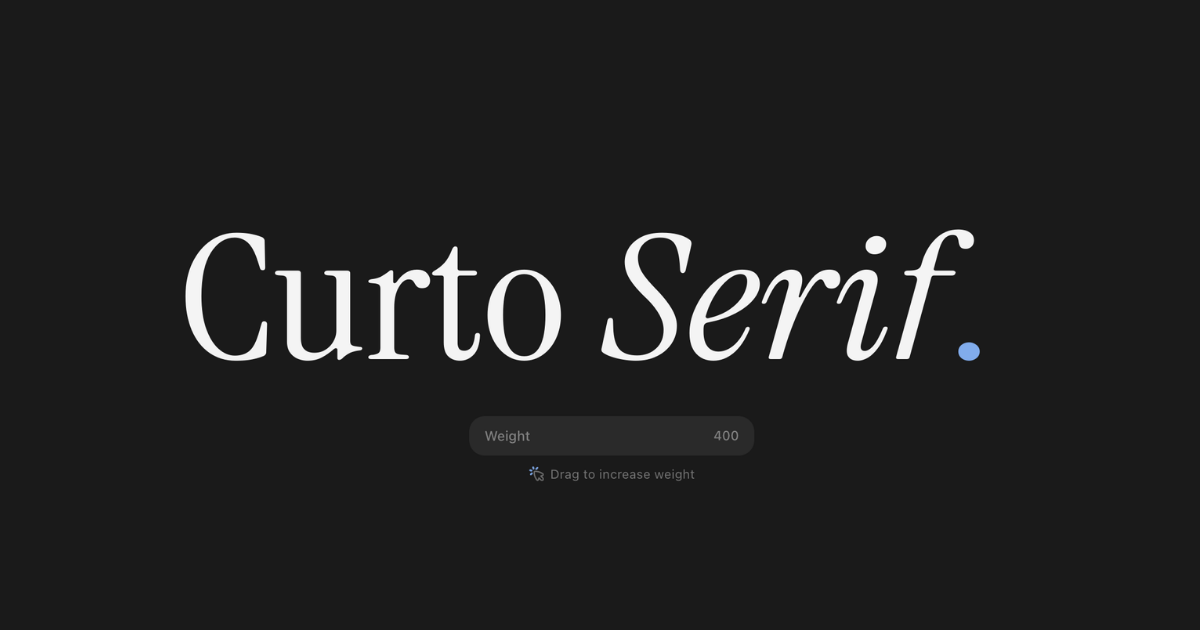
Every year, the same search spikes: best serif 2026. Designers want something with more personality than Inter, more editorial weight than a system serif, and fewer licensing headaches than a commercial family. Most lists answer with the same dependable names.
My answer this year is Curto Serif - a free, open-source display serif built for headlines, covers, wordmarks, and brand moments that need a little more edge. If you searched for the Curto font, this is it. And if you are looking for a free open-source serif font that does not feel like a compromise, this is the case for it.
What makes the best serif for 2026?
The best serif is not the one with the most weights or the most dramatic contrast. It is the one that does the job in front of it. In 2026, that usually means five things:
- It holds up at scale. A display serif should look intentional at 96px and not turn into a texture at 14px.
- It has a real italic. A slanted roman is not the same thing. Italics carry emphasis, rhythm, and voice.
- It has a usable weight range. One weight is a specimen. A variable axis is a design system.
- Its license is boring. Commercial use, embedding, modification, and redistribution should not require a meeting.
- It has a point of view. The page should feel different before anyone reads a word.
Curto was designed around that list. It is not trying to be a neutral text workhorse. It is trying to give editorial layouts a spine.
Curto Serif, in one paragraph
Curto Serif is a contemporary display serif with a Roman and a true italic, a variable weight axis from 400 to 700, 376 glyphs, and support for 86 languages. It is released under the SIL Open Font License 1.1, which means it is free for personal and commercial work. The entire project - source files, build scripts, specimen page - is on GitHub.
The design sits in the useful middle ground between a book serif and a fashion-magazine display face. There is enough contrast to feel designed, but not so much that the letterforms disappear when you set them small. The italic is drawn, not slanted. The weight axis is small enough to stay coherent and wide enough to matter.
Try it without installing anything
Specimens are more convincing than adjectives. This is a live, editable headline set in Curto Serif. Drag the elastic weight slider, click the line, and type your own words.
Drag to increase weight
The clear, clever trick for higher impressions
Most typeface pages make the same mistake: they describe the font, then hide it behind a download button. The visitor has to install something before they can experience the product. That is a conversion problem and an SEO problem.
The trick is simple: make the search result the specimen. Put the phrase people actually searched for on the page, set it in the typeface, and let them edit it. Not a screenshot. Not a carousel. A live line of type.
This is not a meta-tag trick, and it is not a way to fool Google. It is a way to make the page worth ranking:
- It answers the query instantly. Someone searching for the best serif in 2026 can see the font before they scroll.
- It makes the result more clickable. When the title and OG image are the specimen, the search result and the social card do the selling.
- It gives people a reason to stay. A slider and an editable headline turn a static page into a small tool. Tools get used.
- It creates something to share. Designers screenshot their own headline and post it. That is distribution you did not have to buy.
- It earns links. A useful specimen is easier to reference than a paragraph about “crafted letterforms.”
Impressions are a function of surface area. A static specimen has one surface: the page. An editable specimen has three: search, social, and the visitor's own screenshot. The design does the marketing.
Do not tell people the font has personality. Set their sentence in it and let them feel it.
The same principle applies beyond type. If you sell a tool, put the tool on the landing page. If you sell a template, let people edit the template. If you sell a font, let them type. The fastest way to earn attention is to remove the distance between the search result and the thing itself.
Where Curto works - and where it does not
Curto is a display serif. That is a strength, not a limitation, as long as you use it for the right job.
Use it for
- Editorial headlines and covers where the title needs to carry the layout.
- Wordmarks and brand systems that need warmth without becoming decorative.
- Landing page hero lines that should feel written, not generated.
- Packaging, menus, and posters where a little contrast goes a long way.
- Pull quotes and short passages at display sizes, especially in italic.
Do not use it for
- 12px UI labels. Use Inter or your product's interface face.
- Long body copy. Pair Curto with a text serif or sans and let each do its job.
- Every heading on every page. Restraint is what makes a display face feel special.
A good pairing is Curto for the headline and Inter for the interface. If you want an all-serif editorial system, pair Curto with a workhorse text serif such as Source Serif 4. If you want high-contrast fashion energy, Playfair Display is still the obvious reference. Curto sits closer to the editorial middle: enough drama for a cover, enough control for a product page.
How to ship Curto in a real project
Self-host the variable font, preload it if it is used above the fold, and always declare a fallback. A minimal setup looks like this:
@font-face {
  font-family: "Curto Serif";
  src: url("/fonts/CurtoSerif[wght].woff2") format("woff2-variations");
  font-weight: 400 700;
  font-style: normal;
  font-display: swap;
}

h1 {
  font-family: "Curto Serif", Georgia, serif;
  font-weight: 560;
  font-variation-settings: "wght" 560;
  letter-spacing: -0.02em;
}
<link
rel="preload"
href="/fonts/CurtoSerif[wght].woff2"
as="font"
type="font/woff2"
crossorigin
>Three practical notes. First, do not load the italic unless you use it above the fold; it is a second file. Second, avoid faux bold by choosing a variable weight instead. Third, if your site only needs Latin, consider subsetting the font - but keep the license file with the distribution.
The Curto specimen page also uses the variable font for its editable hero and weight slider, so you can inspect the real implementation before you ship it.
Free and open source, without a catch
Curto is licensed under the SIL Open Font License 1.1. You can use it in commercial work, modify it, embed it in an app, and redistribute it with your product. Keep the OFL notice with the font files, and do not sell the font by itself. That is the whole deal.
Open source does not mean unfinished. The repository includes the source, the build pipeline, the license, and the specimen. If you find a missing glyph or a spacing issue, you can open an issue or send a pull request instead of waiting for a foundry roadmap.
Frequently asked questions
Is Curto Serif free for commercial use?
Yes. The SIL Open Font License 1.1 permits commercial use, modification, embedding, and redistribution. Keep the OFL.txt file with the font and do not sell the font files by themselves.
Is Curto Serif a good body text font?
It is designed as a display serif. Use it for headlines, covers, wordmarks, and short passages at larger sizes. For long body copy, pair it with a text serif or a clean sans-serif such as Inter.
What is the best free open-source serif font in 2026?
There is no single best serif for every job. Curto Serif is a strong choice for editorial display work, while Source Serif 4 is excellent for long-form text. Pick the typeface that fits the scale and tone of the project.
Does an editable specimen really improve SEO?
Not directly. It makes the page more useful and shareable, which can improve click-through rate, time on page, and links. Those are helpful signals, but no design trick guarantees rankings.
How many weights and languages does Curto support?
Curto has a variable weight axis from 400 to 700 in both Roman and italic, 376 glyphs, and support for 86 languages.
Set the headline
The best serif for 2026 is the one that makes the work feel inevitable. For editorial headlines and brand moments, Curto Serif earns its place: free, open source, variable, and built with an actual point of view.
Download Curto Serif, type your own headline into the specimen, and see whether it belongs in your next project. If it does, the page has already done its job.